Image Upload Column2.3
Publisher Description
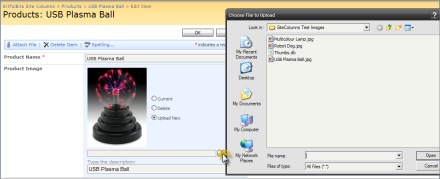
Image Upload component is intended to upload and display pictures for list item. It provides ability to directly select a picture in file browsing dialog, upload and display it in the list view.
Component provides quick mechanism of manipulating picture upload, edit and delete actions. It is possible to setup filtering using predefined or custom extentions.
Features:
- Direct image uploading
- Image description support (used as alternative text for the picture)
- File extensions filtering (predefined and custom extentions supported)
- Ability to upload files on any type (documents, archives and others)
- Support any type of SharePoint list (not only Picture Library)
- Image thumbnails for list views
- Resize large images after upload
- Images stored in separate internal list subfolder (no conflict with attachments)
- Customizing image appearance in list view and item Edit/Display forms (specifying image size, limiting image size, displaying image as a link)
- Language pack support (desired localization could be added by request)
Why ArtfulBits Image Upload Column?
Default process of associating an image with a list item in SharePoint is not so obvious and comfortable. Default WSS 3.0 "Hyperlink or Picture" column does not allow uploading images via browsing and requires you to set the url of the image already existing on the site. In order to associate images with some item in a list in MOOS 2007 user should create the separate picture list and then set the url of certain image to picture column via the modal dialog.
Artfulbits Image Upload Column provides you with easier and flexible way to do this. Image Upload column allows the user to browse their local computer for image of interest. Once the image is selected, column will automatically upload the image and link it to the item.
About Image Upload Column
This Components & Libraries program is available in English, German, Russian. It was last updated on 29 September, 2026. Image Upload Column is compatible with the following operating systems: Windows, Windows-mobile.
The company that develops Image Upload Column is ArtfulBits. The latest version released by its developer is 2.3. This version was rated by 1 users of our site and has an average rating of 3.0.
The download we have available for Image Upload Column has a file size of 2.1 MB. Just click the green Download button above to start the downloading process. The program is listed on our website since 2016-11-02 and was downloaded 53 times. We have already checked if the download link is safe, however for your own protection we recommend that you scan the downloaded software with your antivirus. Your antivirus may detect the Image Upload Column as malware if the download link is broken.
How to install Image Upload Column on your Windows device:
- Click on the Download button on our website. This will start the download from the website of the developer.
- Once the Image Upload Column is downloaded click on it to start the setup process (assuming you are on a desktop computer).
- When the installation is finished you should be able to see and run the program.
Program Details
System requirements
Download information
Pricing
Version History
version 2.3
posted on 2016-11-02
New Features:
- Added SharePoint 2016 support
Improvements:
- GIF animated images are displayed in the list view
- ICO images display is improved
version 2.1
posted on 2014-04-09
New Features:
- Added SharePoint 2013 support
- Added RTL support
- Added German, Russian and French localizations
Improvements:
- Added Spell Checker support for image description
- Added "Save site as template" support
- Improved TIFF/TIF files support
version 1.71
posted on 2011-06-09
New Features:
- Added Dutch localization
Improvements:
- Added support for new licensing model (ArtfulBits License Manager v1.4)
- Added "Save site as template" support
Bugs Fixed:
- Fixed image tooltip
- Fixed minor issues
